Auto Crop Image
Precision client-side photo framing utility for standard 16:9, 3:2, 4:3, and 1:1 aspect ratios.
How this tool works
Resizing photos to fit specific site layouts usually creates two problems: stretching distorts your subject, and blind auto-crop scripts slice right through whatever matters most. This workspace gives you a manual viewfinder across standard 16:9, 3:2, 4:3, and 1:1 formats so you control the exact crop.
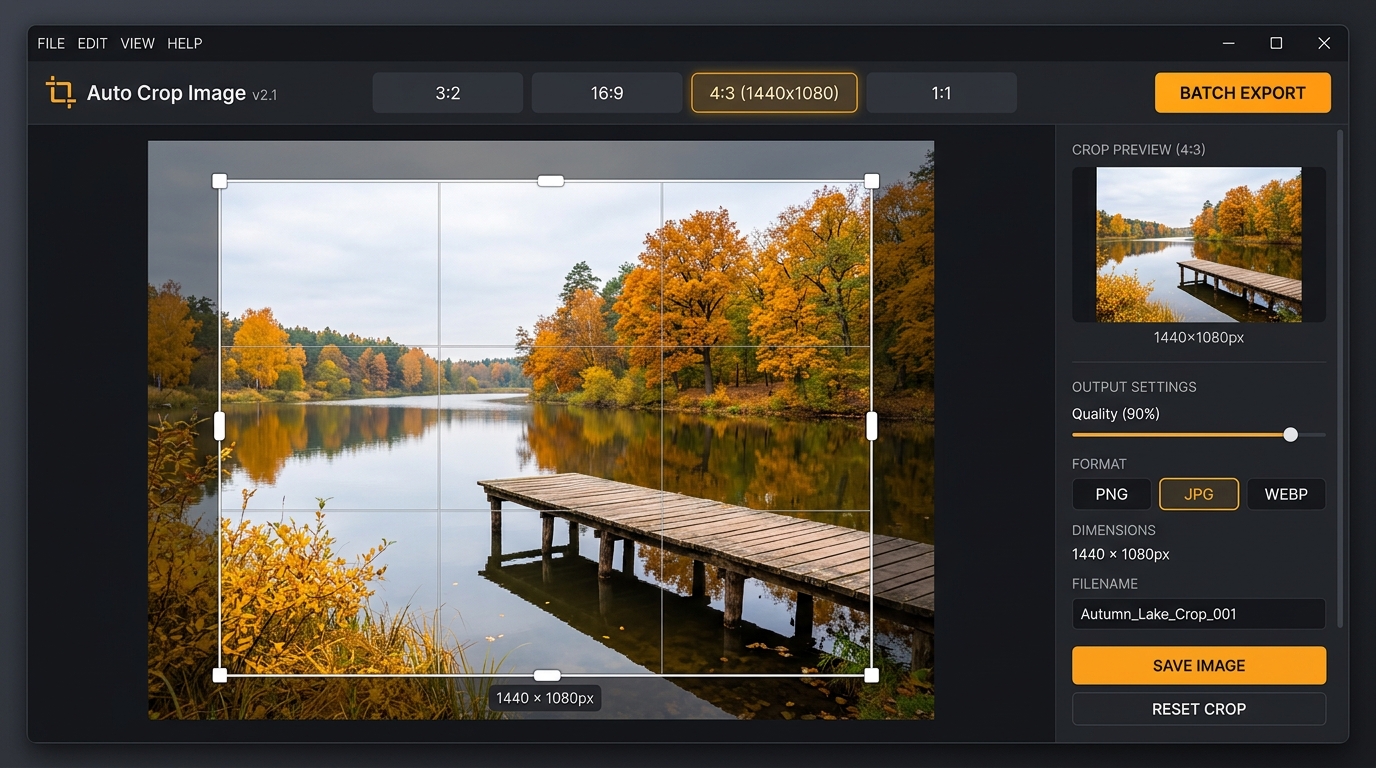
Framing by hand
Drop any picture into the workspace. The white box shows your exact crop boundary. Because the proportions stay locked, dragging any corner changes the frame size without distorting width or height. Drag inside the box to center your subject, or click the alignment controls to pin it straight against the edges.
Exporting singles or batches
You can save crops individually in PNG, JPG, or WebP. Choose between the 1080px baseline, original source pixels, or double resolution (2x) for retina screens. If you need every ratio at once, click the ZIP download button — the script renders all four variants in memory and archives them on the spot.
Privacy note
Nothing leaves your computer. We don't have a backend image pipeline, and Cloudflare only delivers the static scripts. Every crop, scale, and ZIP bundle runs on your device's CPU/GPU via the browser canvas.